If your vCenter 6.5 Enhanced Authentication Plugin not working, you just need to navigate to https://vmware-plugin:8094 and add a certificate exception.
[via]http://www.jonkensy.com/vcenter-6-5-enhanced-authentication-plugin-not-working/[/via]
some foobar

If your vCenter 6.5 Enhanced Authentication Plugin not working, you just need to navigate to https://vmware-plugin:8094 and add a certificate exception.
[via]http://www.jonkensy.com/vcenter-6-5-enhanced-authentication-plugin-not-working/[/via]
Since weeks one windows machine wasn't able to install the latest "Monthly Rollups", but other updates work. After reboot the installer starts until 86% and undone the update. Internet search did not bring much, except some users with an alternative bootloader who have the same problem. But this machine has no other bootloader. The Windows Update log did not have any helpful details, which also makes sense since it had to give for the installation of the update its own log. I remembered the CBS.log, which I used in another problem and what should I say ... there was the error code 80004005 - with helpfull details.
[...]
Error      [0x018009] CSI    00000052 (F) Done with generic command 5; CreateProcess returned 0, CPAW returned S_OK
    Process exit code 112 (0x00000070) resulted in success? FALSE
    Process output: [l:8995 [4096]"BFSVC: BfspCopyFile(C:\Windows\boot\PCAT\bootmgr, \\?\GLOBALROOT\Device\HarddiskVolume1\Boot\bootmgr) failed! (Attempt 1 of 60) Last Error = 0x70
BFSVC: BfspCopyFile(C:\Windows\boot\PCAT\bootmgr, \\?\GLOBALROOT\Device\HarddiskVolume1\Boot\bootmgr) failed! (Attempt 2 of 60) Last Error = 0x70
[...]
BFSVC: BfspCopyFile(C:\Windows\boot\PCAT\bootmgr, \\?\GLOBALROOT\Device\HarddiskVolume1\Boot\bootmgr) failed! (Attempt 10 of 60) Last Error = 0x70
BFSVC: BfspCopyFile(C:\Windows\boot\PCAT\bootmgr, \\?\GLOBALROOT\Device\HarddiskVolume1\Boot\bootmgr) failed! (Attempt 11 of 60) Last Error = 0x70
BFSVC: BfspCopyFile(C:\Windows\boot\PCAT\bootmgr, \\?\GLOBALROOT\Device\HarddiskVolume1\Boot\bootmgr) failed! (Attempt 12 of 60) Last Error = 0x70
BFSVC: BfspCopyFile(C:\Windows\boot\PCAT\bootmgr, \\?\GLOBALROOT\Device\Harddis[gle=0x80004005]
[...]
It was not possible to write parts of the bootloader. I assign a drive letter to \HarddiskVolume1 with diskpart and i see the problem. The drive was out of space. Only 12Kb free, but lots of garbage. The drive is also used for Recovery (WinRE). Then I recognized the cause. The disk was cloned from a HDD to a SSD with lower capacity. After resize the HarddiskVolume1 to original size, the update works without any problem.
After upgrading an openSUSE machine, the Bugzilla installation no longer works. Each run of the checksetup.pl crashes with "segmentation fault". After updating perl with cpan and some research the solution for the problem was very simple:
To create a softlink, which should work through a network share, a junction should be created with mklink:
[...]mklink
Creates a symbolic link.

MKLINK [[/D] | [/H] | [/J]] Link Target

        /D      Creates a directory symbolic link.  Default is a file
                symbolic link.
        /H      Creates a hard link instead of a symbolic link.
        /J      Creates a Directory Junction.
        Link    specifies the new symbolic link name.
        Target  specifies the path (relative or absolute) that the new link
                refers to.
[via]https://www.windowspro.de/andreas-kroschel/ntfs-dateiverknuepfungen-links-unter-windows-7[/via]
 ~ # esxcli software vib list | grep Mel
net-mst 2.0.0.0-1OEM.550.0.0.472560 Mellanox VMwareCertified [...]

~ # esxcli software vib remove -n net-mst
Removal Result
   Message: The update completed successfully, but the system needs to be rebooted for the changes to be effective.
   Reboot Required: true
   VIBs Installed:
   VIBs Removed: Mellanox_bootbank_net-mst_2.0.0.0-1OEM.550.0.0.472560
   VIBs Skipped:
~ #
I order two new - cheap - FTDI FT232RL USB-to-Serial Adapters on AliExpress.
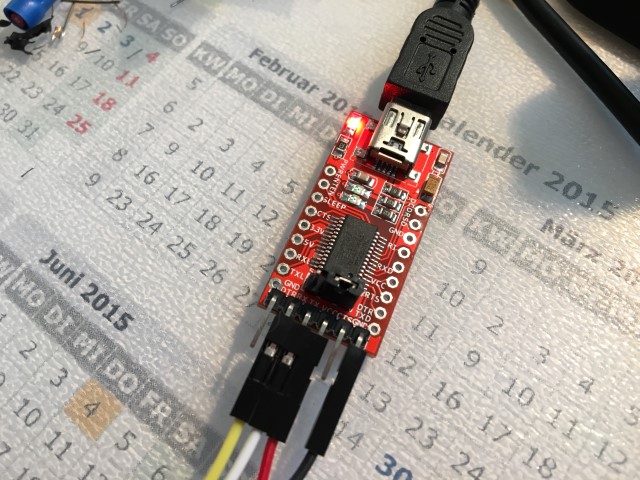
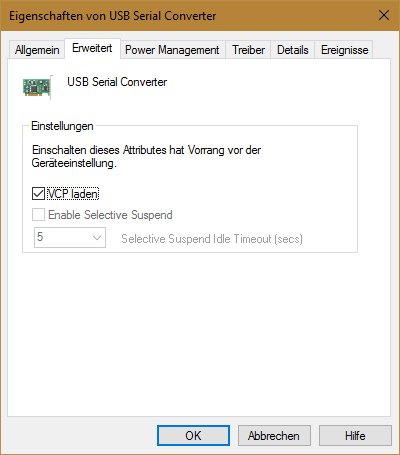
After connecting, the first disappointment came directly. The Windows Device Manager displayed no COM port. Only a USB Serial Converter. The update of the driver brought no improvement. By coincidence I discovered the "Load VCP" option. After I activated this, the USB Serial Interface was displayed correctly.
Quickly the next disappointment came, both showing only gibberish.
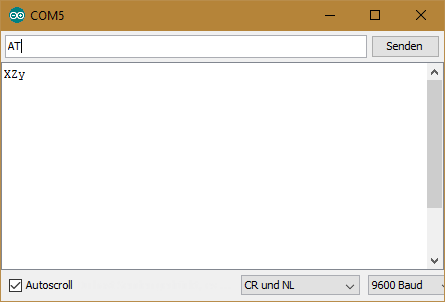
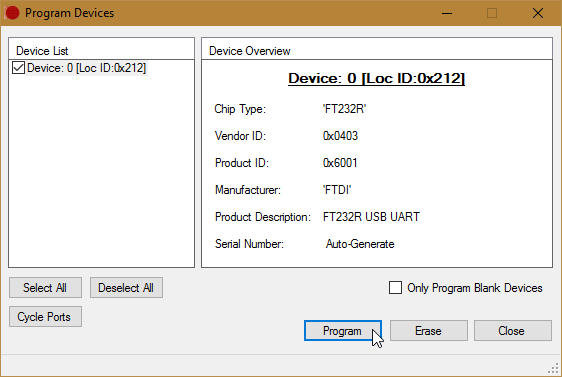
I thought at first that the baud rate is incorrect, but with an older adapter it working correctly. On the FTDI website i found a tool called "FT_Prog". With these programming utility you can read and write the EEPROM for use with FTDI devices. After a few clicks I could see the difference:
![2016-09-04 16_24_14-FTDI - FT Prog - Device_ 0 [Loc ID_0x212]](https://blog.spaps.de/wp-content/uploads/2016/09/2016-09-04-16_24_14-FTDI-FT-Prog-Device_-0-Loc-ID_0x212.png)
![2016-09-04 16_28_39-FTDI - FT Prog - Device_ 0 [Loc ID_0x212]](https://blog.spaps.de/wp-content/uploads/2016/09/2016-09-04-16_28_39-FTDI-FT-Prog-Device_-0-Loc-ID_0x212.png)
Since I was not sure if there are other differences, I used the template function of the tool to copy the settings.
![2016-09-04 16_37_31-FTDI - FT Prog - Device_ 0 [Loc ID_0x212]](https://blog.spaps.de/wp-content/uploads/2016/09/2016-09-04-16_37_31-FTDI-FT-Prog-Device_-0-Loc-ID_0x212.png)
![2016-09-04 16_38_10-FTDI - FT Prog - Device_ 0 [Loc ID_0x212]](https://blog.spaps.de/wp-content/uploads/2016/09/2016-09-04-16_38_10-FTDI-FT-Prog-Device_-0-Loc-ID_0x212.png)
When trying to use saved credentials in Remote Desktop Connection you might receive this message:
Your credentials did not work. Your system administrator does not allow the use of saved credentials to log on to the remote computer because its identity is not fully verified. Please enter new credentials.
To be able to use saved credentials in this situation you need to do the following:
Now you should be able to use your saved credentials.
[via]http://answers.microsoft.com/en-us/windows/forum/windows_7-security/remote-desktop-connection-not-using-saved/13a17d84-b008-4767-95fb-b891e9e6bc66?auth=1[/via]
With following procedure you can create a .p12/.pfx certificate with a *.crt (CA) and a *.key (Key file) file.
openssl pkcs12 -export -in ca.crt -inkey keyfile.key -out out.p12
With following procedure you can change your password on an .p12/.pfx certificate using openssl.
Export you current certificate to a passwordless pem type:
openssl pkcs12 -in mycert.pfx/mycert.p12 -out tmpmycert.pem -nodes
Enter Import Password: <Enter no password>
MAC verified OK
Convert the passwordless pem to a new pfx file with password:
openssl pkcs12 -export -out mycert2.pfx/mycert2.p12 -in tmpmycert.pem
Enter Export Password: <Enter password here>
Verifying - Enter Export Password: <Enter password here>
Now you are done and can use the new mycert2.pfx file with your new password.
[via]http://stackoverflow.com/a/35158695[/via]
INSERT INTO component_cc (SELECT '<user id>' as user_id, component_id FROM component_cc JOIN components ON component_cc.component_id = components.id WHERE components.product_id = <product id>)